IP Network Visibility and Control

Live Network Dashboard
View all traffic flows live, including source / destination, IP, protocol, port and data volume. Receive online or idle activity notifications. Usage counters (MO/MT) and configurable usage-based email monitoring alerts.

Deep Dive Analytics
Review detailed historic packet-level activity. View heat maps to aggregate usage over time. Graphical usage summary for debugging, analysis, and anomaly detection. Advanced tools for reverse DNS, IP geolocation, ping, traceroute, and tcpdump.

Apply Real Time Controls
Manage Cloudloop private networks, for example, IP blocks and associated routing. Assign public IP addresses. View service status and uptime indications and monitor network topology.

Remote Firewall Management
Configurable firewall rulesets: update and apply rules immediately at any time. Full audit trail and event log of firewall changes. Packet level visibility of any blocked traffic. Batch operation functionality to easily action account level changes.
A Network Overview
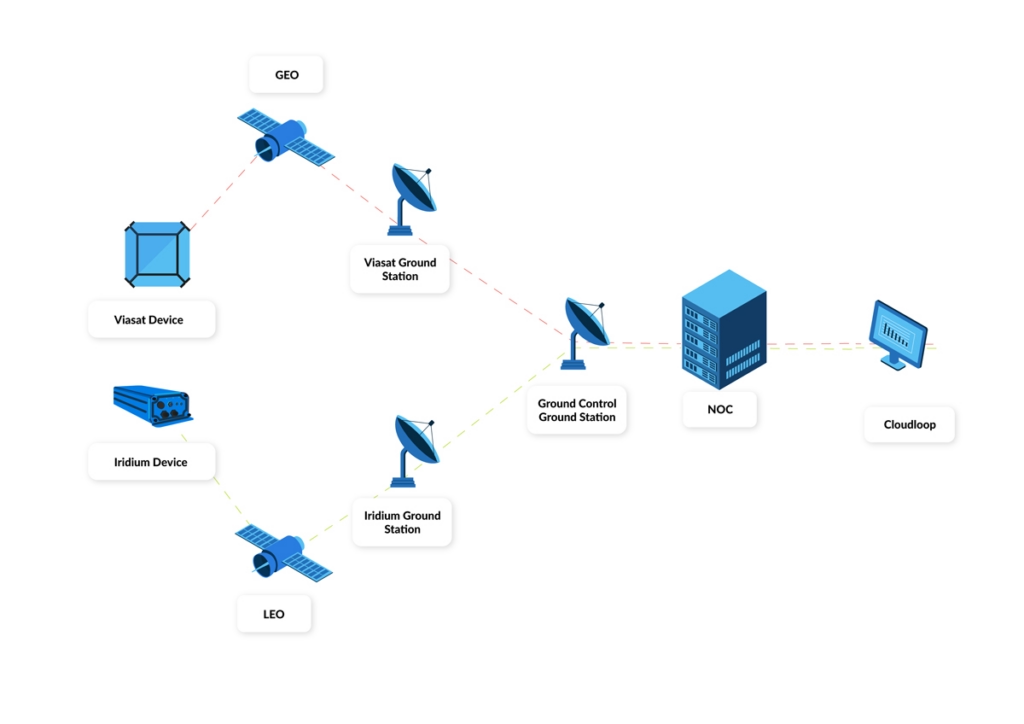
Our ground network provides the infrastructure for connections between Satellite Network Operators (SNO) such as Iridium and Viasat, and Ground Control’s data center. This enables satellite data transfer and connectivity from terminals to customers on the internet, or on their own private networks.
The Cloudloop Network Operating Centre (NOC) provides engineering and technical insight into the information flowing across the network, capturing metadata to identify where traffic is flowing to and from in real time.
NOC enables our technical support team internally, and customers externally, via defined levels of access, to make changes to the network flow, either programmatically or via an automated change set up in the NOC.
Check Network Usage
Cloudloop NOC is both a map and window into what is happening over the network in real time. Providing an accurate physical location of multiple devices, while also presenting the metadata to know what is being transmitted to and from each device to each end destination.
As devices activate, and send and receive information over the network, the dashboard presents color coded activity demonstrating live activity.
Investigate Device Behavior
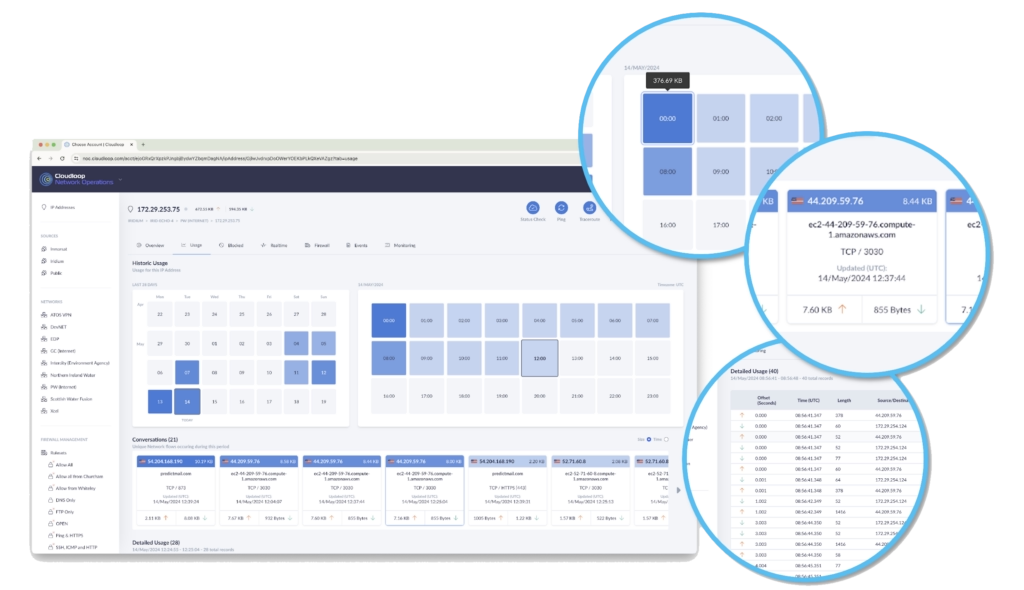
From the general overview, zoom into a device or IP address to view a breakdown of MO and MT, showing transmission frequency and aggregated data, including up and down byte counts.
Identify the individual packets of data to see what destination your device is talking to, quantify the data being transferred, view the resolved DNS name or host name, and the individual protocol being used.
NOC provides information to verify that your device is behaving as you expect.
View Historic Usage
For retrospective network analytics, the NOC provides a rolling 30 day history of device usage. The day view, a color modulated dashboard, helps identify higher traffic volumes or periods of inactivity quickly. Check individual conversations and view the individual packets of information.
‘Conversations’ show the data moved between the device and the server, or end destination, as they occurred. By default, these can be sorted by size or chronological order, supporting all debugging and troubleshooting activity.
A detailed level of network insight shows if a device is being too chatty (sending too much data). Devices can be reconfigured remotely to block unwanted traffic. Helping to cut down on unnecessary transfers, and saving on airtime usage.
Firewall Management
Providing autonomous firewall controls in your account, with an unlimited number of rule sets that are designed and applied in real time. All firewall changes are logged, time stamped, and a historical record sits within your account for future reference.
With a dashboard enabled view of all blocked traffic, a place to check rates and device transmission times. See which data you are being charged for, and the traffic blocked by the firewall that hasn’t been billed.
Diagnostics and Debugging
NOC makes it easier to run diagnostics on your system. The Ping command can be used to originate a Ping out to the network from your device or your private network. All debugging attempts show under the events section to support real time verification.
Traceroute enables a more detailed network investigation to look at the steps as the traffic flows through the network. Public IP addresses can also be mapped interactively from the NOC.
NOC tools speed up troubleshooting, save costs and time. Replacing the need for any onsite visits if things are not going as planned.
Threshold Monitoring and Alerts
Within NOC, customize thresholds for daily usage, and setup instructions for notifications. Multiple thresholds can be applied and monitored against the real time count of bytes flowing through the network.
Email notifications speed responses to concerns about network usage or device threshold breaches. Supported by the event log, which shows a full history and accountability for all notifications.
Exercise full control to set data flow limits for security, bill management, and peace of mind.
Customer Feedback on NOC:
“Cloudloop NOC alerted us to unusually high data usage on a device. Using the heatmap and network tools, we traced the spike to a Microsoft update server and quickly blocked the traffic, avoiding a significant unexpected bill.”
Frequently Asked Questions
- Iridium SBD devices
- Iridium Certus devices
- Iridium Messaging Transport devices
- Iridium GO!
- RUDICS and Iridium dial-up data services
- Iridium satellite phones such as the Iridium Extreme 9575
- Viasat Go-anywhere Pro (BGAN) devices
- Viasat IoT Pro (BGAN M2M) devices
- Globalstar tracking devices
- Iridium SBD
- Iridium Messaging Transport
- Iridium RUDICS
- Iridium Telephony
- Iridium Certus 100
- Iridium Certus 200
- Iridium Certus 700
- Viasat Go-anywhere Pro (BGAN)
- Viasat IoT Pro (BGAN M2M)
- GlobalstarTelit cellular
Using our fully featured API, you can take full control of your Iridium SBD, Certus, Satellite Phone and Viasat Go-anywhere Pro and IoT Pro contracts and billing and integrate them with your own platform. Making it easy for you to activate, suspend, deactivate and review billing information programmatically via your own system.
In fact, Ground Control are the only Iridium Service Provider who will deliver your SBD data directly to and from your own Amazon SQS queues. We provide a CloudFormation stack which creates your queues and takes care of cross account permissions.
More From Cloudloop

Cloudloop Tracking
Stay connected to your fleet or team with real-time tracking and customizable alerting options.
Cloudloop Device Manager
Remotely monitor device status and push firmware or configuration updates without on-site access.

Cloudloop Subscription Manager
Control your airtime plans and usage across devices, with tools to activate, pause, or adjust as needed.
Cloudloop Data
Oversee your data management and control data flow, choosing from a broad range of fully integrated destinations.
Find Out More About NOC
Cloudloop NOC helps your project monitor data flow across the network and provides tools for predictive and cost-effective network management. Find out more about how to monitor your network health, manage security, and maintain your network performance.
For a free demonstration of Cloudloop NOC, and to answer any questions, please complete the form to arrange a viewing.